
Greetings, esteemed public! Here's Yellow, and today we're going to take a look at adding comments to our promotional posts.
I'm a bit surprised that the arbitration community, which is actively interested in the possibilities of Facebook API, still does not have a suitable recruiting software, although the idea seems to be on the surface. Hopefully, after this article is published, these tools will appear on the market.
So, responsibly I declare that by the end of reading, you will have "on hand" a method of tipping, with which you can immediately get right down to business!
What we'll need:
- Multiple autoregs, with an avatar uploaded and a name under the desired GEO (in the CIS with Russians, in the Bourgeois with Latin names.);
- Access Token Tokens from each of these autoregs;
- CUCKS of each autoreg in CURL format;
- The post ID of your ad;
- The id of the fp on which the post is posted;
- CURL program, with which we will send requests;
- Commentary Texts.
If with the first two points everything is clear, then with the rest let's deal in detail.
Getting cookies in the required format
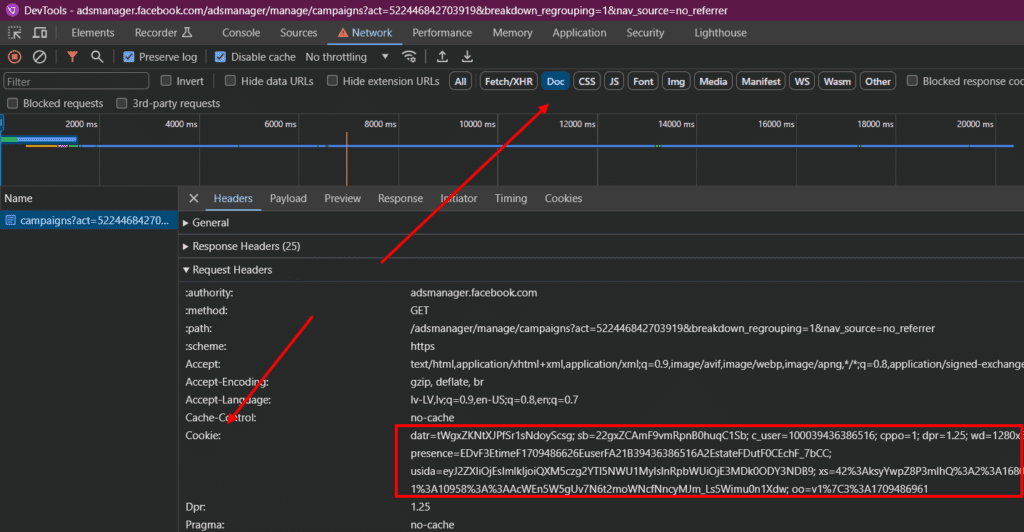
Let's go. antidetectopen our autoreg, on behalf of which we will publish a comment, go to Ads Manager and open Developer Tools (F12). There we go to the Network tab, switch the request type switch to Doc and refresh the page (F5). We see the request, click on it and in the Request Headers section we see cookies in the format we need. Copy them to ourselves.
Get the post ID of the commitment and the fp
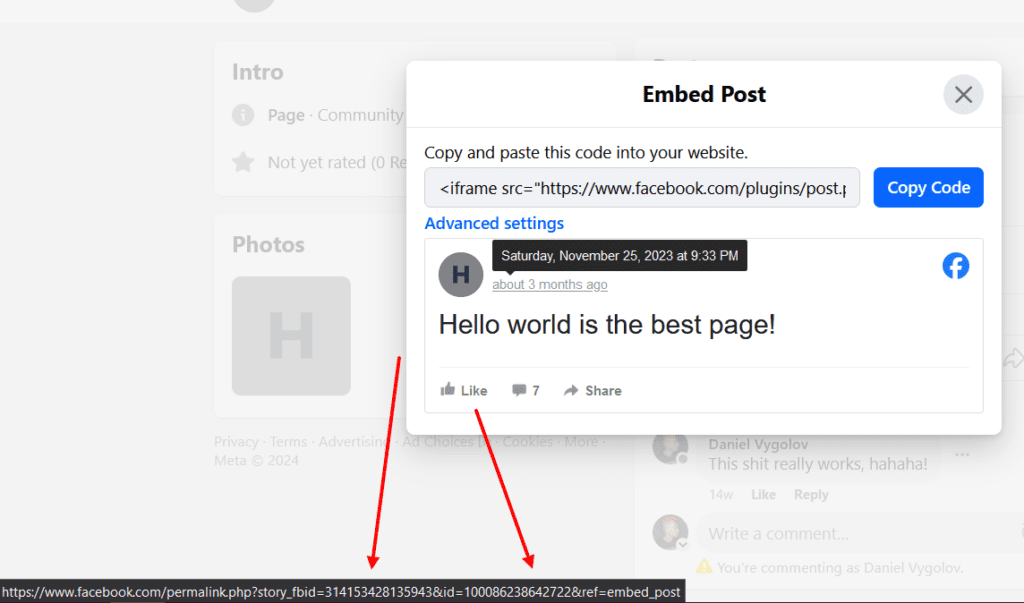
Within fb, each ad "belongs" to the fp you are spinning it with. That is, in essence, a post on fb. To get the ID of the post go from Ads Manager from editing the ad to view the post with comments, then in the menu (three dots on the right) at the post select Embed post, put the cursor on the date and see at the bottom:
storyfb_id is the id of the post, and just id is the id of the fp
Publish a comment using CURL
We have almost everything ready to publish our first comment. To send requests to the API we will use the console program CURL. On mac it's built-in by default, so we just run Terminal. And for Windows download CURL from here and unzip the archive into any folder, then run the console (Start-Run-cmd-Enter) and navigate to this folder (cd Full_Way_to_Folder).
Let's go! Copy the query below somewhere in your notebook and fill it with all the necessary data: fp id, post id, token, comment, cookies. Yes, the comment text be sure to run it through UrlEncoder! Otherwise you'll get an error Malformed input.
Then copy the filled template to the console and press Enter.
curl "https://graph.facebook.com/v19.0/fpId_postId/comments?access_token=token&method=post&message=Thank you!" --cookie "c_user=10003943638656; cppo=1; wd=1280x610; usida=eyJ2ZXIiOjEsImlkIjoiQXchF_7bCC"
If you inserted something incorrectly, curl or feb will give you an error. For example, if you inserted a cookie incorrectly, it will be Invalid Request:

If successful, you will see a response from fb in the console that says the id of your new published comment will be written:

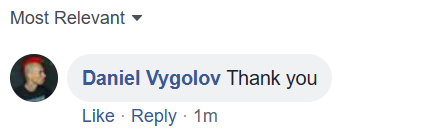
You'll also see this comment right below your post:
All you have to do is fill in and type the command for each of your autoregs in the console and get the number of comments you need. If you want to use proxy together with CURL - read the help, the software supports them.
Additional chips
Comment on comment (comment branches)
If you want to comment on another comment, just use the previously obtained id value of the comment you want in the console instead of the fpId_postId part of our request.
A comment on behalf of the FP
If you want to leave a comment not on behalf of the soc, but on behalf of the fp that hangs on the soc (it's very convenient: just collect a pool of fpc's with the necessary names and photos of the generated people.), it is enough to change the token from Ads Manager in the request to the token from the required fpshka.
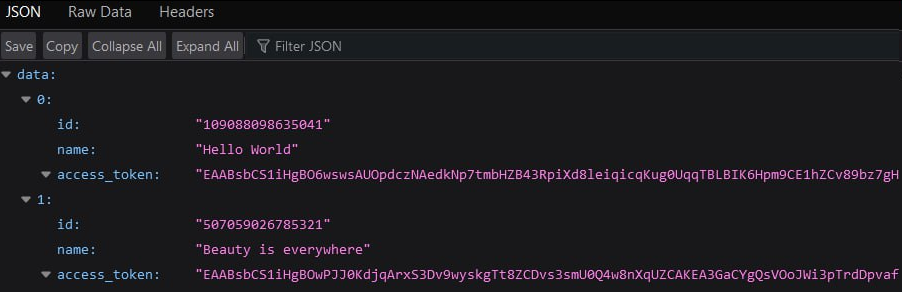
Here's the request:https://graph.facebook.com/v19.0/me/accounts?fields=id,name,access_token&access_token=TOKEN
Change the word TOKEN in it to the usual one from Ads Manager and run this query directly in the browser in a new tab, for example. It will show you all the fp's and their tokens.
But be aware that fb has a limit on the number of comments left from one sots (about seven or eight comments) If you have a bunch of fp's hanging on one soc, once you hit that limit, you will only be able to post comments after 24 hours! To bypass the limit, hang your fp's on 3-4 accts at once.
Developer token
Если вы часто используете те или иные акки для комментирования, то рекомендую вместо токена от Ads Manager брать токен из аккаунта разработчика — писал про это подробно тут. Он лучше живёт и не имеет обыкновения внезапно меняться, к тому же, при его использовании не нужны куки.
Conclusion
I hope it was helpful! If you liked the article - don't forget to write a comment and subscribe to my tg channel. And, of course, pour it on the plus side, your masha!
Leave a comment